

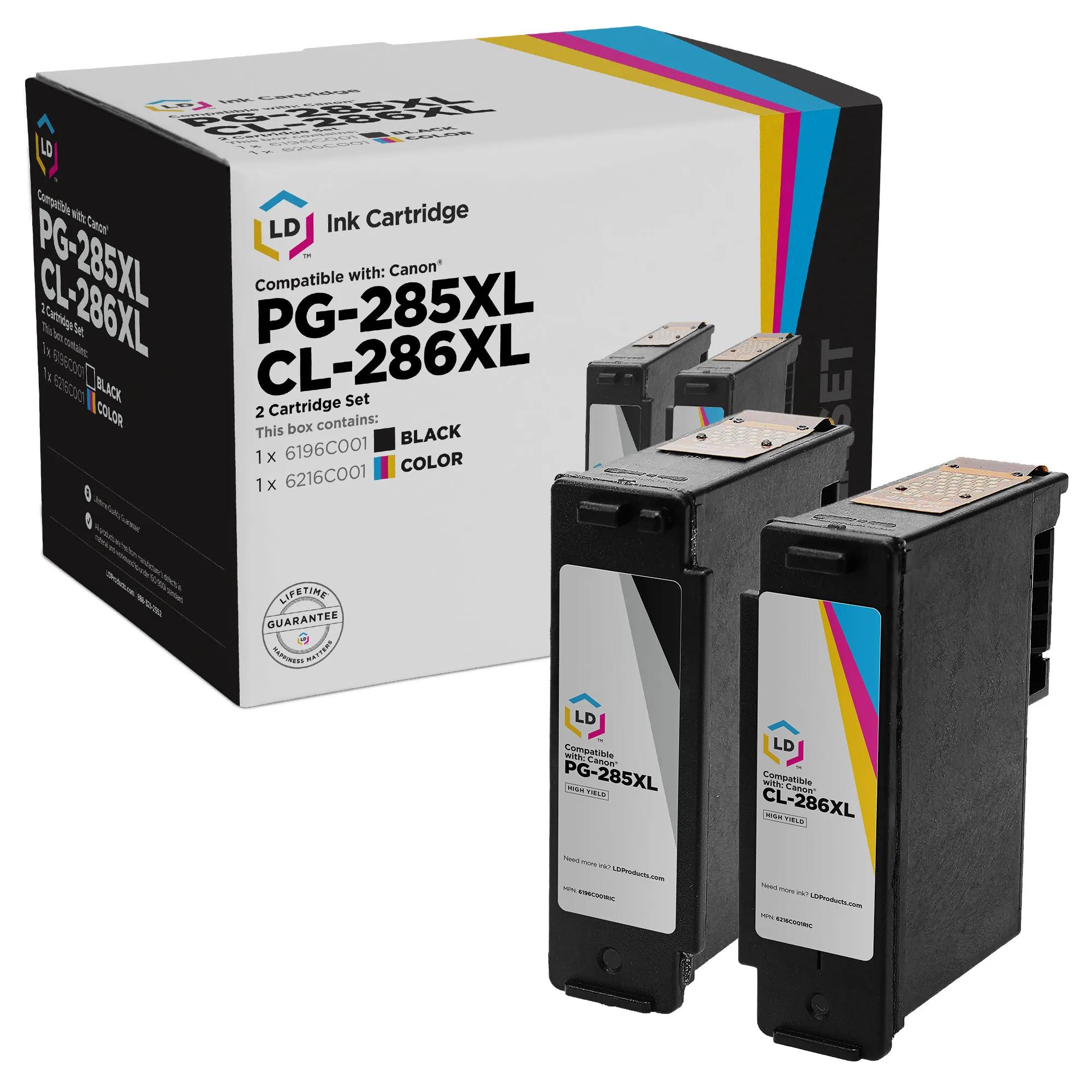
Quick Answer: Canon PG-285/285XL (black) and CL-286/286XL (tri-color) ink cartridges work in three Canon PIXMA printers: TR7820, TS7720, and TS7722. Standard cartridges yield 180 pages each; XL versions yield 400 pages each — over 2x more. LD Products offers the remanufactured PG-285XL starting at $32.99 — a fraction of the cost of a name-brand cartridge, backed by our lifetime guarantee.
What is the Canon PG-285 / CL-286 ink series?
The Canon PG-285 / CL-286 series is a two-cartridge ink system designed for the Canon PIXMA TR7820, PIXMA TS7720, and PIXMA TS7722 all-in-one inkjet printers.
Canon offers each cartridge in two yields:
- Standard yield (PG-285, CL-286) — 180 pages each, designed for light home use
- XL high-yield (PG-285XL, CL-286XL) — 400 pages each, with a significantly lower cost per page
The pigment-based black ink delivers sharp, smudge-resistant text on plain paper, while the dye-based tri-color cartridge produces vibrant photos and graphics. For a broader overview of Canon’s lineup, see our Ultimate Guide to Canon Ink Cartridges.
PG-285 vs PG-285XL vs CL-286 vs CL-286XL: what’s the difference?
The short answer: XL versions hold more ink and print over 2x more pages, but every cartridge in this series fits the same three printers.
| Name / Product | Price | Page Yield | Yield Type | Part Number |
|---|---|---|---|---|
| Remanufactured Canon PG-285 Black Ink Cartridge | Coming Soon | ~180 pages | Standard | 6197C001 |
| OEM Canon PG-285 Black Ink Cartridge | $23.34 | ~180 pages | Standard | 6197C001 |
| Remanufactured Canon CL-286 Tri-Color Ink Cartridge | Coming Soon | ~180 pages | Standard | 6217C001 |
| OEM Canon CL-286 Tri-Color Ink Cartridge | $35.47 | ~180 pages | Standard | 6217C001 |
| Remanufactured Canon PG-285XL Black Ink Cartridge | $32.99 | ~400 pages | High Yield | 6196C001 |
| OEM Canon PG-285XL Black Ink Cartridge | $40.75 | ~400 pages | High Yield | 6196C001 |
| Remanufactured Canon CL-286XL Tri-Color Ink Cartridge | $46.99 | ~400 pages | High Yield | 6216C001 |
| OEM Canon CL-286XL Tri-Color Ink Cartridge | $61.11 | ~400 pages | High Yield | 6216C001 |
| Set of 2: OEM Canon PG-285 & CL-286 | $57.18 | ~180 pages each | Standard Yield | 6197C001, 6217C001 |
| Set of 2: Remanufactured Canon PG-285XL & CL-286XL | $78.98 | ~400 pages each | High Yield | 6196C001, 6216C001 |
| Set of 2: OEM Canon PG-285XL & CL-286XL | $99.17 | ~400 pages each | High Yield | 6196C001, 6216C001 |
| Set of 5: Remanufactured Canon PG-285XL (3) & CL-286XL (2) | $183.00 | ~400 pages each (3 BK + 2 CL) | High Yield | 6196C001, 6216C001 |
*Page yield is per cartridge, based on ISO/IEC 24711 testing at 5% coverage. Actual results vary depending on print settings, page content, and usage patterns.
Note: Prices mentioned are subject to change without notice. For the latest pricing and availability, please visit LD Products.
Which Canon printers use PG-285 and CL-286 ink?
Canon PG-285 and CL-286 cartridges are designed exclusively for three Canon PIXMA models. They are not compatible with any other Canon printer.
- Canon PIXMA TR7820 — Compact all-in-one with auto duplex printing, 35-sheet automatic document feeder, prints up to 15 ipm black and 10 ipm color at 1200 x 1200 dpi resolution
- Canon PIXMA TS7720 — Wireless all-in-one with 2.7″ touchscreen and dual-band Wi-Fi (2.4 + 5 GHz)
- Canon PIXMA TS7722 — Same hardware as the TS7720, sold through select retailers
All three are Energy Star certified and EPEAT Silver rated. They support AirPrint, Mopria, the Canon PRINT app, and Amazon Alexa.
If your printer isn’t one of these models, you’ll need a different Canon ink series. Common look-alikes include the PG-275/CL-276 series (TS3520, TR4720) or the older PG-260/CL-261 series (TR7020, TS6420).
How many pages does Canon PG-285 / CL-286 print?
Per Canon’s official ISO/IEC 24711 testing at 5% page coverage:
- PG-285 (standard black): 180 pages
- PG-285XL (high-yield black): 400 pages
- CL-286 (standard color): 180 pages
- CL-286XL (high-yield color): 400 pages
Both standard cartridges yield 180 pages. Both XL cartridges yield 400 pages — a 122% increase over standard yield. If most of your printing is plain text documents, your black PG-285 cartridge will run out faster than your CL-286 color. If you print photos or color-heavy pages, expect the opposite. Actual page yield will vary based on what you print.
Upgrading from a Canon PG-275/CL-276 printer? Here’s what’s different
If you previously owned a Canon PIXMA TS3520, TS3522, or TR4720, you used the PG-275 and CL-276 ink series. The PG-285/CL-286 is the next-generation replacement series — but the cartridges are not interchangeable.
Key differences when upgrading to a PG-285 / CL-286 printer:
- Higher XL page yield. Standard yields are the same across both series (180 pages each). The meaningful gain is at the XL tier — per Canon’s ISO/IEC figures, the PG-285XL prints 400 pages vs the PG-275XL’s 300.
- Different physical cartridge. A PG-275 will not fit a TR7820, TS7720, or TS7722 — the cartridge body, chip, and seating are entirely redesigned.
- Same two-cartridge architecture. If you liked the simplicity of the PG-275 system, you’ll feel right at home with PG-285.
Standard yield vs XL: which Canon PG-285 should I buy?
For almost everyone with a TR7820, TS7720, or TS7722 — buy the PG-285XL. The math, using LD’s actual reman pricing and ISO/IEC per-cartridge yields:
| Cartridge | LD Price | Pages | Cost per page |
|---|---|---|---|
| PG-285XL black | $32.99 | 400 | $0.082 |
| CL-286XL color | $46.99 | 400 | $0.117 |
| Set of 2 (XL + XL) | $78.98 | 400 each | $0.099 avg |
| Set of 5 (3 BK + 2 CL XL) | $183.00 | 400 each | $0.092 avg |
The XL prints over 2x more pages than standard yield at a significantly lower cost per page. Standard PG-285 only makes sense if you print rarely or the printer is a backup unit. For everyone else — students, families, home offices, small businesses — the PG-285XL is the better buy.
Do I need both cartridges installed to print?
Yes. The PIXMA TR7820, TS7720, and TS7722 require both the PG-285/XL black and CL-286/XL color cartridges installed to print anything — even a black-and-white document.
Tip: keep both cartridges stocked, or grab a set of 2 multipack so you always have a spare. If you’ve ever been caught with an empty cartridge mid-print job, you already know why this matters.
How to install Canon PG-285 and CL-286 ink cartridges?
These are FINE cartridges, meaning the print head is built into the cartridge. In short: with the printer turned on, open the scanning unit, peel the protective tape off the new cartridge, and seat it — the color CL-286 in the LEFT slot and the black PG-285 in the RIGHT slot. Close the ink cartridge locking cover until it clicks, then lower the scanning unit. The printer runs an automatic print-head cleaning cycle before printing. The same process applies to the TR7820, TS7720, and TS7722.
For the full step-by-step with photos and tips, see our help-center guide: How to install Canon PG-285 and CL-286 ink cartridges.
If your printer doesn’t recognize the new cartridge after install, the most common causes are leftover protective tape, dirty electrical contacts, or an ink cartridge locking cover that didn’t fully click into place. Reopen the scanning unit, remove and reseat the cartridge, and make sure the locking cover clicks shut. Full troubleshooting: “Cartridge cannot be recognized” — how to fix.
Buy individually or as a multipack?
LD Products offers three buying options depending on your printing volume:
- Set of 2 — $78.98. (1) PG-285XL black + (1) CL-286XL color. Best for light to moderate users who want one full replacement set, and a meaningful saving over the equivalent OEM set.
- Set of 5 — $183.00. (3) PG-285XL black + (2) CL-286XL color. Best for heavy users, families, or anyone who wants to stock up.
- Individual cartridges — PG-285XL: $32.99 and CL-286XL: $46.99.
Why the 3:2 ratio in the Set of 5? Because for most users, black depletes faster than color. We built the bundle to match how you actually print.
Note: Prices mentioned are subject to change without notice. For the latest pricing and availability, please visit LD Products.
Frequently Asked Questions
Which Canon printers use PG-285 ink?
Canon PG-285 (and PG-285XL) ink is used in three PIXMA models: TR7820, TS7720, and TS7722.
Is PG-285XL the same cartridge as PG-285?
Same family, different yields. PG-285XL holds 12.7 ml of pigment ink and prints 400 pages. PG-285 standard holds 7.3 ml and prints 180 pages. Both fit the same printers.
Can I use a PG-285XL in a printer that came with a PG-285 standard?
Yes. The TR7820, TS7720, and TS7722 all accept either version interchangeably. There’s no firmware or hardware difference — just more ink in the XL.
Is there a Canon PG-285XXL or a higher yield version?
No. Canon makes this series in two yields only: standard (about 180 pages) and XL (about 400 pages). There is currently no higher yield version available.
Why does my Canon printer say “cartridge not recognized” after I install a new PG-285?
The top three causes are leftover protective tape, dirty electrical contacts, or an ink cartridge locking cover that didn’t fully click into place. Remove the cartridge, gently wipe the contacts with a dry lint-free cloth, and reseat firmly — making sure the locking cover clicks shut. Full steps: how to fix “cartridge cannot be recognized”.
How do I reset the ink level on Canon PG-285?
Canon’s chipped cartridges don’t allow manual reset. After installing a remanufactured cartridge, a low-ink warning may appear. Typically, you can hold the Stop/Resume button for 5–10 seconds to dismiss it. Print quality is unaffected. More detail: low-ink warning on a remanufactured cartridge — is it normal?
Why is my Canon PG-285 or CL-286 printing streaky or faded?
This usually points to a clogged print head. Run a nozzle check and then print-head cleaning from the printer’s maintenance menu; one or two cycles clears most issues. If a color is still missing, the cartridge may be empty or seated poorly. Full steps: how to fix streaky, faded, or missing colors.
What’s the difference between Canon PG-285 and PG-275?
Different printer families. PG-275 is for the PIXMA TS3520 and TR4720. PG-285 is for the newer TR7820, TS7720, and TS7722. The two series share the same standard yield (180 pages), but the PG-285XL prints more than the PG-275XL (400 vs 300 pages). They are not interchangeable.
What’s the difference between Canon PG-285 and PG-245?
Different printer generations entirely. PG-245 is for older PIXMA models like the MG2522 and TR4520. PG-285 is for the newer TR7820/TS7720/TS7722 line. Not compatible across generations.
How long does an unopened PG-285 cartridge last?
Shelf life is typically 18–24 months. Store the cartridge upright in a cool, dry place out of direct sunlight.
What’s the difference between remanufactured Canon PG-285 and OEM?
A remanufactured PG-285 uses a genuine cartridge body that’s been professionally cleaned, refilled with quality-matched ink, fitted with a fresh chip, and individually tested. Print quality and page yield match OEM. The main differences are price (remanufactured costs less) and environmental impact (reman keeps cartridges out of landfills). Under the Magnuson-Moss Warranty Act, using a remanufactured cartridge won’t void your printer’s warranty unless the manufacturer can prove the cartridge directly caused the damage.
Ready to save? Shop the full remanufactured Canon PG-285/CL-286 series at LDProducts.com — same quality as name-brand at a fraction of the cost, backed by our lifetime guarantee.



Leave a Reply