

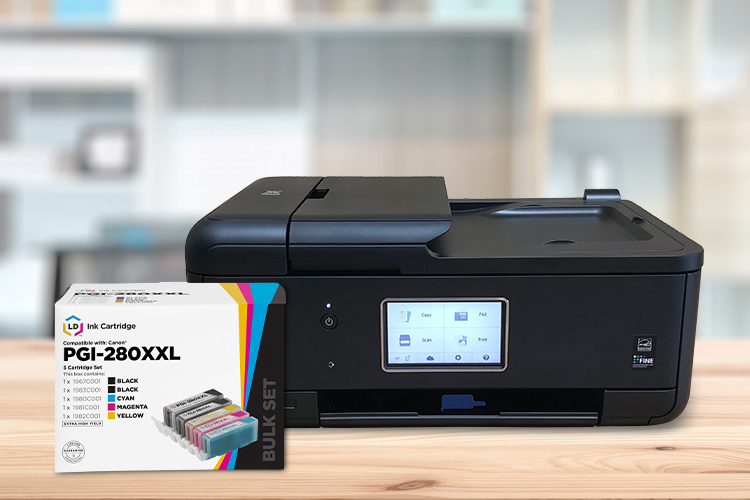
Home and home-office printing has not slowed down, and a single set of genuine ink can cost more than the printer it goes in. Compatible and remanufactured cartridges from LD Products deliver comparable print quality for far less, backed by our lifetime guarantee on every remanufactured and compatible cartridge. We have helped customers cut printing costs since 1999, across more than 20 million orders. Below are our best-selling ink series for 2026, what each one yields, and how to find the best option for your specific printer brand. See all of our best-selling ink and toner in one place, or shop the Back-to-School sale while it runs.
In this guide:
- Why are compatible ink cartridges so much cheaper?
- Ink tanks or print-head cartridges: which does your printer use?
- What are the best compatible ink cartridges in 2026?
- Are compatible cartridges as good as the name brand?
- Find the best compatible ink for your brand
- How do I get the most value from my ink?
- Frequently asked questions
Why are compatible ink cartridges so much cheaper?
A compatible cartridge is a brand-new, non-OEM cartridge built to fit your printer; a remanufactured cartridge is a genuine shell that has been professionally cleaned, refilled, and retested. Both cost less than the name brand because the supplier does not carry the printer maker’s research, firmware, or hardware costs. Buying remanufactured also keeps a used shell out of the landfill, so it saves money and reduces waste at the same time. Page yields are still measured to the same standard the manufacturers use, ISO/IEC 24711 for inkjet ink at 5 percent coverage, so you can compare a compatible cartridge to a genuine one directly. For the full breakdown, see our guide on name brand vs. remanufactured vs. compatible cartridges.
Ink tanks or print-head cartridges: which does your printer use?
Inkjet brands use two cartridge styles, and some printers use refillable bottles. Print-head cartridges have the print head built into the cartridge; Canon’s PG/CL FINE cartridges and HP’s 63, 65, 67, and 68 are this type, used on home printers. Individual ink tanks are separate cartridges that feed a print head built into the printer; Canon’s PGI/CLI, HP’s 902, 952, and 962, and every Brother LC and Epson cartridge are this type. Epson EcoTank printers refill built-in tanks from bottles instead. Brother and Epson printers have a permanent print head, so they use ink tanks or bottles only.
What are the best compatible ink cartridges in 2026?
These are the compatible and remanufactured ink cartridges our customers buy and reorder most, all in stock and backed by our lifetime guarantee. To compare value fairly, look at cost per page (price divided by ISO page yield), not the sticker price. You’ll find these same favorites on our most-popular ink and toner page.
| Top pick | Cartridge type | Works with (printers) | Page yield per cartridge (ISO/IEC) | Typical savings |
|---|---|---|---|---|
| Canon PGI-280XXL / CLI-281XXL | Individual ink tank | PIXMA TR7520/8520/8620, TS6320, TS9520 | Black ~600; color ~820 | up to ~65% |
| Epson 232 / 232XL | Individual ink tank | Expression XP-4200; WorkForce WF-2930/2950 | 232XL black ~380; 232 color ~140 | up to ~55% |
| HP 952XL | Individual ink tank | OfficeJet Pro 8710/8720/7740, 8210–8740 | Black ~2,000; color ~1,600 | up to ~55% |
| Canon PGI-250 / CLI-251 | Individual ink tank | PIXMA iP7220/8720, MG5420–7120, MX922 | PGI-250XL black ~500; CLI-251XL color ~660 | up to ~60% |
| Brother LC401 / LC401XL | Individual ink tank | MFC-J1010DW, J1012DW, J1170DW | Standard ~200; high-yield (XL) ~500 | up to ~55% |
1. Canon PGI-280 / CLI-281
This five-ink set is our best-selling compatible ink. The PGI-280XXL pigment black prints about 600 pages and the CLI-281XXL colors about 820 pages. It works with select PIXMA printers, including the TR7520/8520/8620, TS6320, and TS9520. Shop compatible PGI-280XXL/CLI-281XXL set.
2. Epson 232 / 232XL
The Epson 232 fits the current Expression XP-4200 and WorkForce WF-2930 and WF-2950 all-in-ones. As individual ink tanks, the 232XL black prints about 380 pages; the color cartridges come in standard 232 only, about 140 pages each (Epson does not offer a 232XL color). Shop remanufactured Epson 232/232XL.
Epson and the cartridge model number are registered trademarks of Epson America, Inc. and are not affiliated with LDProducts.com, and are used solely to demonstrate compatibility.
3. HP 952 / 952XL
The 952XL is an individual ink-tank set fitting the OfficeJet Pro 8710, 8720, and 7740 all-in-ones. The black prints about 2,000 pages and each color about 1,600. Shop remanufactured HP 952XL set.
4. Canon PGI-250 / CLI-251
The PGI-250XL and CLI-251XL ink-tank set fits a large installed base of older PIXMA photo and office printers, including the popular MX922. The PGI-250XL pigment black prints about 500 pages and the CLI-251XL colors up to about 660 pages. LD carries sets of 5, 6, and larger bulk packs. Shop compatible PGI-250XL/CLI-251XL.
5. Brother LC401 / LC401XL
The LC401 / LC401XL series is made for the MFC-J1010, J1012, and J1170. The standard prints about 200 pages and the XL about 500. Shop compatible LC401XL set.
Are compatible cartridges as good as the name brand?
For everyday documents and color, quality-tested compatible and remanufactured cartridges deliver comparable print quality. Because page yields are measured to the same ISO/IEC standard, you can compare them head to head. Quality does vary by supplier, so read the reviews and confirm the company stands behind its product. Our cartridges are tested for performance, quality, and page yield, and every remanufactured and compatible cartridge is backed by our lifetime guarantee. Consumer Reports has noted that third-party ink performs well for typical printing, and independent testing generally finds the gap matters only for exacting professional photo work.
Using a compatible cartridge does not void your printer warranty. The Magnuson-Moss Warranty Act (15 U.S.C. 2302) protects that right, unless the manufacturer can prove a specific cartridge caused direct damage. Think of it like buying store-brand acetaminophen instead of the name brand: the same active result for far less money.
Find the best compatible ink for your brand
Each brand has its own bestsellers, printer families, and yield tiers. We broke down the top compatible ink series for each major brand, with the exact printers they fit:
- Best Compatible HP Ink Cartridges (2026) — the 952XL, 950XL/951XL, and 902XL cartridges for OfficeJet Pro, plus the 63 and 67 for DeskJet, ENVY, and OfficeJet.
- Best Compatible Canon Ink Cartridges (2026) — the PGI-280/CLI-281 and PGI-250/CLI-251 photo ink sets, the PG-275/CL-276 print-head pair, and the CLI-42 pro-photo set.
- Best Compatible Brother Ink Cartridges (2026) — the LC401, LC3013, and LC203, plus the INKvestment LC3035 and high-volume LC406 for MFC and DCP printers.
How do I get the most value from my ink?
Buy high-yield cartridges. A higher-yield cartridge holds more ink, prints more pages, and lowers your cost per page; look for “XL” in the part number, like HP 63XL, or “XXL” for extra-high yield. Learn more in our high-yield guide. To keep ink from drying out, store cartridges sealed and upright in a cool, dark place, and run a short print job every couple of weeks once installed. If you rarely print, a laser printer may suit you better, because toner powder does not dry out; see our ink vs. toner guide to decide.
Frequently asked questions
Are compatible ink cartridges worth it?
Yes. For everyday home and office printing, a quality-tested compatible or remanufactured cartridge prints the same page as the name brand for noticeably less, commonly 45 to 65 percent off. Buy from a supplier that tests its cartridges and backs them with a guarantee.
Are compatible ink cartridges as good as name brand?
For standard documents and everyday color, yes. Page yields are measured to the same ISO/IEC standard, so you can compare them directly. The name brand may hold a slight edge only for professional photo work that depends on exact color profiles.
What is the most popular compatible ink cartridge?
The Canon PGI-280/CLI-281 five-ink set is the best-selling compatible ink, followed by the Epson 232 and the HP 952XL. Your best pick still depends on your printer brand and model. See our full best-seller list.
How much can you save with compatible ink?
Most shoppers save 45 to 65 percent versus the genuine price, and more on individual high-markup cartridges. Comparing cost per page rather than the sticker price shows your real savings.
Do compatible cartridges void my printer’s warranty?
No. The Magnuson-Moss Warranty Act (15 U.S.C. 2302) protects your warranty when you use third-party ink, unless the manufacturer can prove a specific cartridge caused direct damage.
What does page yield mean?
Page yield is the approximate number of pages a cartridge prints, measured at 5 percent page coverage under the ISO/IEC standard. It lets you compare cost per page fairly across cartridges and brands. Learn more in our guide to page yield.
About the author: This guide was written by the team at LD Products, an ink and toner specialist founded in 1999. We have served more than 8 million customers across 20 million-plus orders and have earned Bizrate’s Circle of Excellence for over 15 years. Every remanufactured and compatible cartridge we sell is tested for performance, quality, and page yield and backed by our lifetime guarantee.

My house printer takes hp 160ink and I can’t find it anywhere. Can you tell me a comptatible ink I could buy?
Hi Shelli, happy to help! What is the model number of your printer?
I have an HP OfficeJet 4620 series All-in-One Printer. I have been using refill cartridges that are not HP for about a year, but all of a sudden I am getting a message that there is a problem with my cartridge. It shows the 3 HP color cartridges as OK, but the black replacement cartridge is the one that is causing trouble. All the cartridges were recently added. the cartridges are no longer moving. They are stuck on the right side and I can not move it as I was able to do in the past. This has me concerned since I can’t use the printer at all. The printer goes on but gives the messages and it is hung up – won’t do anything. Do you have compatible cartridges for these (#564) and if so will it correct what is going on. I’m not even sure how I would get the current cartridges out or the new ones in. I would appreciate any suggestions you may have.
Hi Pat, did you try resetting the printer? To do this, leave the cartridges installed, power down the printer and unplug it from the wall for about a minute. Then power it back on and try printing again. The cartridges should re-center in the carriage on their own. Are you not able to move the carriage that holds the cartridges at all? We do have 564XL cartridges, but if it’s an issue with the carriage being stuck, I don’t think new cartridges will solve the problem.
You can find our ink here: https://www.ldproducts.com/HP/Compatible/Ink-Cartridge/HY-Black/CN684WN/143773-Product.html
What cartridges does the HP Photosmart C4180 printer take for color and black?
Hi Shane, the black cartridge is the 98 series and the color is the 95. You find affordable compatible versions of both on our site here: https://www.ldproducts.com/HP/Ink-Cartridge/PhotoSmart/C4180/2976-Printer.html
Hope this helps!