


Quick Answer: Page yield is the number of pages a printer cartridge can print before it runs out of ink or toner. It is measured under the ISO/IEC 24711 standard for inkjet or ISO/IEC 19752/19798 for toner — printing test pages at 5% coverage until the cartridge is empty. Your actual page count will vary based on what you print, but ISO yield is a consistent, manufacturer-to-manufacturer benchmark.
Page yield is the approximate number of pages you can print with one cartridge. The number is measured under the ISO/IEC 24711 standard (inkjet) or ISO/IEC 19752/19798 (toner) — printing pages at 5% coverage until the cartridge runs empty. How many pages you actually get depends on what you print; heavy photos and graphics deplete ink faster, while light text documents stretch a cartridge further.
Page coverage is the percentage of a printed page covered by ink or toner. The ISO test uses 5% coverage — equivalent to a typical text document with average word count. Photos and full-color graphics regularly hit 30-100% coverage, depleting cartridges much faster than the rated yield.
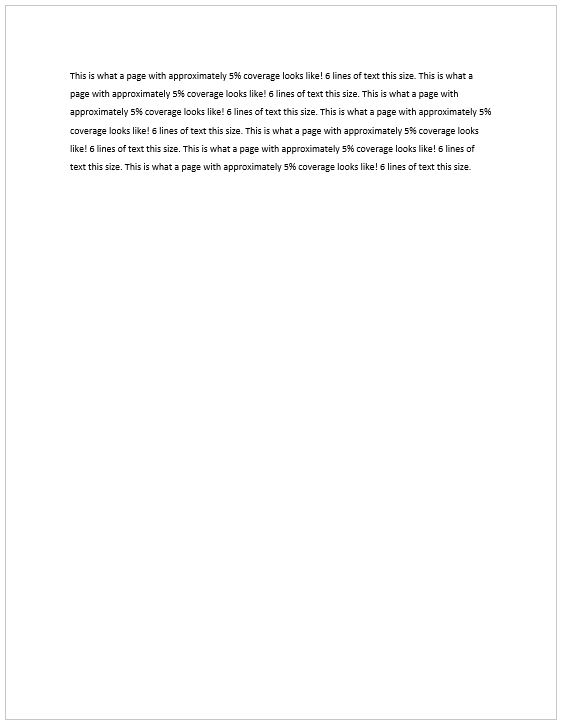
This is what a page with 5% page coverage would look like:
Page yield is a benchmark, not a guarantee. Your actual print count varies based on three main factors:
- Content type — black text uses less ink than full-color photos. Heavy graphics deplete cartridges fastest.
- Page density — long documents and large images consume more ink per page.
- Print quality setting — high-quality mode uses 30-50% more ink than draft mode.
Different Cartridge Page Yields
Cartridge yield options vary by product line. Most families offer 2-3 tiers — standard, high-yield (XL), and sometimes extra-high-yield (XXL). Some cartridges come in a single size only, while others offer four or more variants. The HP OfficeJet Pro 8020 family illustrates a 3-tier example:
| Cartridge | Yield Type | Page Yield |
| HP 910 Black (3YL61AN) | Standard | 250 pages |
| HP 910 Cyan (3YL58AN) | Standard | 315 pages |
| HP 910 Magenta (3YL59AN) | Standard | 315 pages |
| HP 910 Yellow (3YL60AN) | Standard | 315 pages |
| HP 910XL Black (3YL65AN) | High-Yield | 720 pages |
| HP 910XL Cyan (3YL62AN) | High-Yield | 700 pages |
| HP 910XL Magenta (3YL63AN) | High-Yield | 700 pages |
| HP 910XL Yellow (3YL64AN) | High-Yield | 700 pages |
| HP 916XL Black (3YL66AN) | Extra-High-Yield | 1,500 pages |
Installation is identical across yield tiers. A high-yield HP 910XL installs in the same slot as a standard HP 910 — same shape, same fit, more ink. The same applies to the extra-high-yield HP 916XL.

When to use a Standard and a High Yield (or High Capacity) Cartridge
Inkjet cartridge recommendation by usage:
- Light use (under 10 pages/week): Standard-yield cartridges. Higher-capacity cartridges aren’t worth the extra cost when ink can dry out before depletion.
- Regular usage (10-50 pages/week): High-yield (XL) cartridges. Better cost-per-page, fewer replacements, and ink is consumed before drying becomes a concern.
- Heavy use (50+ pages/week): XL or XXL multipacks. Lowest cost-per-page, longest replacement intervals.
If you want to keep more money in your wallet, our remanufactured & compatible printer cartridges deliver the same print quality for substantially less — save up to 65% vs brand-name (OEM) cartridges.
Laser printer cartridge recommendation by setting:
- Home use: Standard-yield toner is typically sufficient for moderate document printing.
- Small office: High-yield (XL) toner reduces replacement frequency at lower cost-per-page.
- High-volume office: Extra-high-yield (XXL) toner cartridges or multipacks deliver the lowest cost-per-page for heavy users.
Shopping for a Printer Based on Page Yields
The cheapest printer often has the most expensive ink. When comparing printers, evaluate three numbers: upfront printer cost, cartridge price, and cartridge yield. The true cost of owning a printer is the upfront price plus 3 years of cartridge replacements.
The page yield of the cartridge will determine how often you’ll need to replace cartridges and how many replacements you may end up buying to keep your printer running. Higher page yields mean less frequent replacements and more cost savings.
Another factor to consider when shopping for a printer, a color printer in particular, is: Does cyan, magenta, and yellow come in one cartridge? Or does each color come in a separate cartridge? If you print a good volume of colored documents, we recommend getting a printer with individual color cartridges (one for cyan, one for yellow, one for magenta). Not only do they come with more ink; but you will also be able to use the printer even if one of the color cartridges is running empty.
Calculating Cost Per Page (CPP)
Cost-per-page (CPP) is the most important printer-cost metric. It converts page yield into dollars-per-page — the actual cost of running the printer. Calculating the cost per page is fairly straightforward, just divide the cost of the printer cartridge by its page yield.
Example: HP 910XL Black Ink (~720 pages)
| Cartridge Option | Price | Page Yield | Cost Per Page |
| Genuine HP 910XL Black (OEM) | $28.67 | 720 pages | 4.0 cents per page |
| LD’s Remanufactured HP 910XL Black | $16.99 | 720 pages | 2.4 cents per page |
| Savings with LD’s remanufactured | 40% less per page | ||
A quality remanufactured cartridge prints the same number of pages at substantially less cost. The math works the same way for the standard HP 910 and extra-high-yield HP 916XL — and across most cartridge families.
Example: HP 910XL Color Cartridges (each ~700 pages)
| Cartridge Option | Price (each) | Page Yield | Cost Per Page (each) |
| Genuine HP 910XL Color (OEM) | $37.77 | 700 pages | 5.4 cents per page |
| LD’s Remanufactured HP 910XL Color | $12.99 | 700 pages | 1.9 cents per page |
| Savings with LD’s remanufactured | 65% less per page | ||
Total color CPP (one black + three color cartridges per printed page):
- OEM total color CPP: Black CPP + (Color CPP × 3) = 4.0 + (5.4 × 3) = 20.2 cents per color page
- LD’s remanufactured total color CPP: Black CPP + (Color CPP × 3) = 2.4 + (1.9 × 3) = 8.1 cents per color page
- You save approximately 60% on every color page you print with LD’s remanufactured HP 910XL cartridges.
Frequently Asked Questions About Page Yield
What is page yield?
Page yield is the number of pages a cartridge can print before it runs out. Manufacturers measure it under the ISO/IEC 24711 standard (inkjet) or 19752/19798 (toner) — printing test pages at 5% coverage until empty.
What does 5% page coverage mean?
It means 5% of the printable area is covered with ink or toner — roughly what a typical text document looks like. Photos or heavy-graphics pages run much higher coverage, so your real-world yield drops accordingly.
Why is my actual page yield lower than what’s advertised?
Real-world page coverage usually exceeds 5%. If you print images, graphics, dense text, or in high-quality mode, your cartridge depletes faster. The ISO/IEC number is a benchmark for comparison — not a personal guarantee.
Do high-yield (XL) cartridges save money?
Usually yes, if you print regularly. An XL cartridge typically holds 2–3x the ink for less than 2x the cost — a better cost-per-page. If you print rarely, a standard cartridge is the safer call since ink doesn’t last forever.
Do multipacks or sets add their page yields together?
No. Cartridges in a set deplete in parallel during real-world printing, not in sequence. A 2-pack with a 400-page black and a 400-page color cartridge prints about 400 mixed-content pages — not 800. Always read yield per cartridge.
Do remanufactured cartridges have the same page yield as OEM?
Yes. A quality remanufactured cartridge prints the same number of pages as the OEM equivalent. Both LD Products’ remanufactured and compatible cartridges are tested for performance, quality, and page yield, and backed by our 100% Satisfaction / Lifetime Guarantee. It’s a lot like generic medicine at the drugstore — same active ingredient, same result, dramatically less expensive.
How do I calculate cost-per-page (CPP)?
Divide the cartridge price by its page yield. Example: a $30 cartridge with a 400-page yield = $0.075 per page (7.5 cents).
What’s the difference between remanufactured and compatible cartridges?
A remanufactured cartridge is an OEM cartridge shell that’s been professionally cleaned, refilled with ink or toner, and tested. A compatible cartridge is a brand-new cartridge built by a third party (not the printer manufacturer) to fit the same printer. Both are aftermarket alternatives to OEM, and LD Products carries both — backed by our 100% Satisfaction / Lifetime Guarantee.
This article was written by the team at LD Products, which has been in the remanufactured & compatible ink and toner cartridges business since 1999 — 25+ years of helping consumers cut printing costs without sacrificing quality. 8M+ customers served. 100% Satisfaction / Lifetime Guarantee on every remanufactured & compatible cartridge. Bizrate Circle of Excellence winner 15+ years running.



How does “print coverage” affect the calculation?
In the example above, it uses the page yield as supplied by the manufacturer. These are based on “5% coverage” meaning that the ink takes up less than 5% of the page.
When printing documents with images, the page coverage value would be much higher.
So if the cartridge is rated at 2200 pages using 5% page coverage, what would the “page yield” be for the same cartridge using 15% page coverage?
Jerry, it would be the same as printing 3 pages at 5% coverage, so divide the total yield by 3. In your example, the yield would be 733 pages. If you were to print a full color 8×10 photo with dense color, that’s 85% coverage – the same as 17 pages at 5%. In your example then, your yield would be about 129 pages with 85% coverage. However, also keep in mind that you would be more likely to use a high quality setting for photos and such – that’s going to use more toner, decreasing the yield.
[…] is referring to what is known as page coverage, or the percentage of a page’s white space covered by toner. Black and white text typically […]
so based on this 5% thing, could you assume, if if all 4 inks was same size ml,and used same amount of each.
then a cartridge had a 1000 page yield @ 5% then we would dived yield by 20 (5×20 = 100) for full 100% coverage, photo`s ect.
1000 / 20 = 50 pages per cartridge…. like 4 carts using equal amount of ink per page on a 100% coverage, would be
@5% coverage yield, needs to be 25%,so (5×5 is 25) so dived the 1000 page yield by 5 = 200 per cartridge, but then there 4 cartridges, so dived by 4 giving you 50 pages (100% coverage of pages) per cartridge
[…] Page yield is the rough amount of an average number of prints your cartridge will give you. If you are buying a cheap device with less page yield, that means soon you will be again in the market looking for ink. […]
This 5% page coverage is a useless calculation because we rarely print JUST 6 lines per page. Who came up with that standard anyway. I’m usually printing 3-4 times that many lines so that means my page yield will be 3-4 times less. I guess my 200 page Canon cartridge will give me roughly 70 pages of black / white document printouts…..
[…] the yield XL ink which will offer 2000 pages and 1500 color pages, each page will be costed around 2 cents, […]
I will be printing black and white only. Can you advise about type of printer and black and white toner cost?
Have Epson WF 2830 printer – how much for black (reg./large) and colored cartridges and how delivered.
Hi Dean,
We offer compatible XL cartridges for your printer here: https://www.ldproducts.com/ink-and-toner/epson/epson-workforce/wf-2830
The black cartridge is $19.99 and the color cartridges are $10.99 each. We ship by USPS and UPS and any order over $50 ships free in the contiguous US.